# Via Eraser

Site officiel de Eraser : <span style="font-size: 11.0pt; font-family: 'Century Gothic',sans-serif; mso-fareast-font-family: Calibri; mso-fareast-theme-font: minor-latin; mso-bidi-font-family: Arial; mso-bidi-theme-font: minor-bidi; mso-ansi-language: FR; mso-fareast-language: EN-US; mso-bidi-language: AR-SA;">[https://eraser.heidi.ie/download/](https://eraser.heidi.ie/download/)</span>

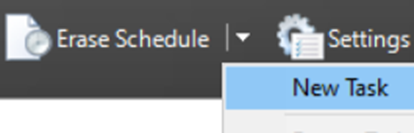
- <span style="font-size: 11.0pt; font-family: 'Century Gothic',sans-serif; mso-fareast-font-family: Calibri; mso-fareast-theme-font: minor-latin; mso-bidi-font-family: Arial; mso-bidi-theme-font: minor-bidi; mso-ansi-language: FR; mso-fareast-language: EN-US; mso-bidi-language: AR-SA;">Lancer Eraser -&gt; Dans le menu choisir -&gt; Erase schedure -&gt; "New Task"</span>

<span style="font-size: 11.0pt; font-family: 'Century Gothic',sans-serif; mso-fareast-font-family: Calibri; mso-fareast-theme-font: minor-latin; mso-bidi-font-family: Arial; mso-bidi-theme-font: minor-bidi; mso-ansi-language: FR; mso-fareast-language: EN-US; mso-bidi-language: AR-SA;">![](https://docs.msid.eu/uploads/images/gallery/2023-05/embedded-image-nlrapbod.png)</span>

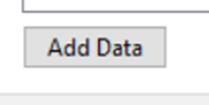
- <span style="font-family: Century Gothic, sans-serif;"><span style="font-size: 14.6667px;">Choisir "Add Data"</span></span>

![](https://docs.msid.eu/uploads/images/gallery/2023-05/embedded-image-9yoqjtjp.png)

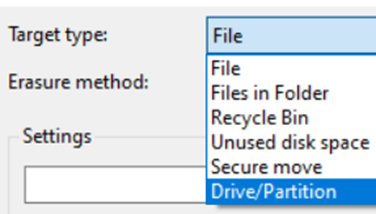
- <span style="font-family: Century Gothic, sans-serif;"><span style="font-size: 14.6667px;">Dans "target type" Choisir "Drive/Partition"</span></span>

![](https://docs.msid.eu/uploads/images/gallery/2023-05/embedded-image-iofpbidj.png)

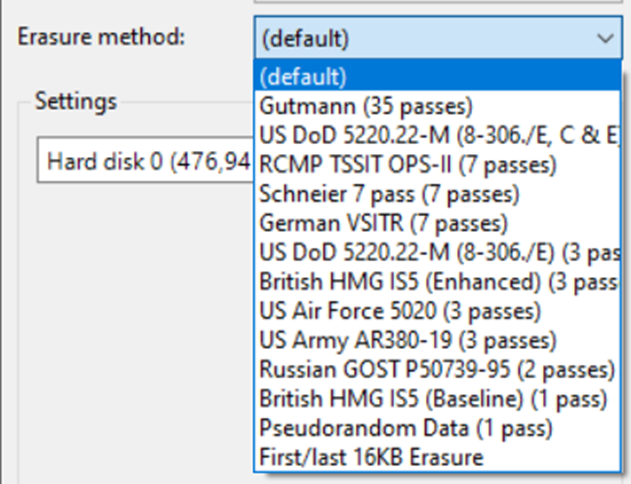
- <span style="font-family: Century Gothic, sans-serif;">Dans "Erasure méthode" Choisir la méthode de formatage avancé</span>
    - <span style="font-family: Century Gothic, sans-serif;">Plus le nombre de "Passes" sera élevé plus les données seront compliquées à retrouver. Voir impossible.</span>

![](https://docs.msid.eu/uploads/images/gallery/2023-05/embedded-image-tzxevkpy.png)

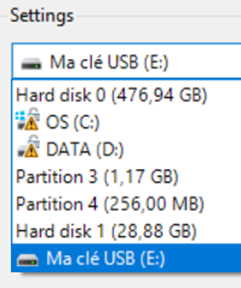
- <span style="font-family: Century Gothic, sans-serif;">Dans la liste, choisir son support de donnée à formater;</span>
    - <span style="font-family: Century Gothic, sans-serif;">Validé par "OK" puis "OK"</span>

![](https://docs.msid.eu/uploads/images/gallery/2023-05/embedded-image-hkaihrdu.png)

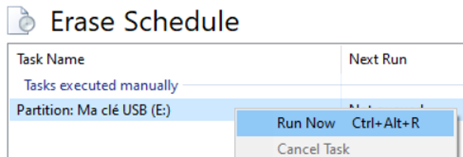
- <span style="font-family: Century Gothic, sans-serif;">Dans le menu principale de Eraser</span>
    - <span style="font-family: Century Gothic, sans-serif;">Sélectionner votre tâche -&gt; Clic droit dessus -&gt; "Run Now"</span>

![](https://docs.msid.eu/uploads/images/gallery/2023-05/embedded-image-o49srn9r.png)

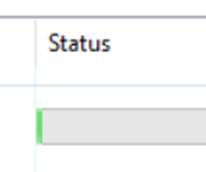
- <span style="font-family: Century Gothic, sans-serif;">La tâche est en cours d'exécution<span style="font-size: 11.0pt; font-family: 'Century Gothic',sans-serif; mso-fareast-font-family: Calibri; mso-fareast-theme-font: minor-latin; mso-bidi-font-family: Arial; mso-bidi-theme-font: minor-bidi; mso-ansi-language: FR; mso-fareast-language: EN-US; mso-bidi-language: AR-SA;">. L’avancement est noté à droite de celle-ci.</span></span>

![](https://docs.msid.eu/uploads/images/gallery/2023-05/embedded-image-uxbh1iva.png)

- <span style="font-family: Century Gothic, sans-serif;">A la fin de l'opération, vous pouvez formater votre support dans un format classique.</span>