# Via le gestionnaire de disque

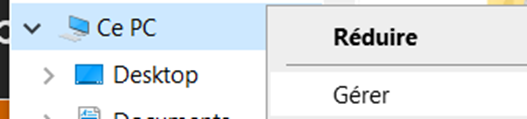
- Sur ce PC -&gt; Clic droit "Gérer"

![](https://docs.msid.eu/uploads/images/gallery/2023-05/embedded-image-ivsqn3oa.png)

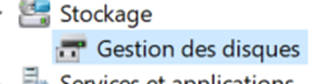
- Dans le menu de gauche aller dans "Gestion des disque"
![](https://docs.msid.eu/uploads/images/gallery/2023-05/embedded-image-o3bkixsv.png)

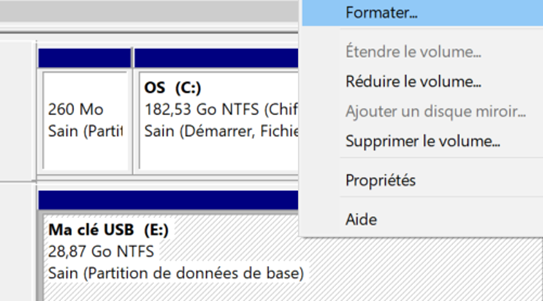
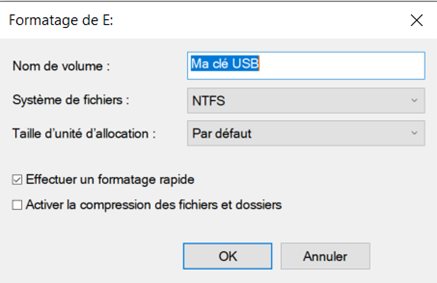
- Sur votre support de données -&gt; Clic droit sur le volume -&gt; "Formater"

![](https://docs.msid.eu/uploads/images/gallery/2023-05/embedded-image-nndixykb.png)

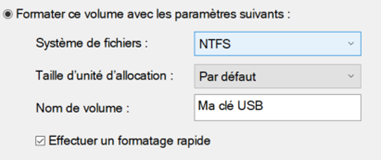
- Choisir le nom du volume
- Choisir le système de fichier
- Cocher "Effectuer un formatage rapide"
- Validé par "OK"
![](https://docs.msid.eu/uploads/images/gallery/2023-05/embedded-image-wslfafex.png)

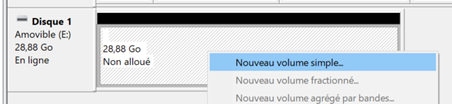
- Créer la nouvelle partition, d<span style="font-size: 11.0pt; font-family: 'Century Gothic',sans-serif; mso-fareast-font-family: Calibri; mso-fareast-theme-font: minor-latin; mso-bidi-font-family: Arial; mso-bidi-theme-font: minor-bidi; mso-ansi-language: FR; mso-fareast-language: EN-US; mso-bidi-language: AR-SA;">ans la liste des disques, vous devez retrouver votre disque, sans volume (Contour noir)</span>
- <span style="font-size: 11.0pt; font-family: 'Century Gothic',sans-serif; mso-fareast-font-family: Calibri; mso-fareast-theme-font: minor-latin; mso-bidi-font-family: Arial; mso-bidi-theme-font: minor-bidi; mso-ansi-language: FR; mso-fareast-language: EN-US; mso-bidi-language: AR-SA;">Faire un clic droit -&gt; "Nouveau volume simple"</span>

<span style="font-size: 11.0pt; font-family: 'Century Gothic',sans-serif; mso-fareast-font-family: Calibri; mso-fareast-theme-font: minor-latin; mso-bidi-font-family: Arial; mso-bidi-theme-font: minor-bidi; mso-ansi-language: FR; mso-fareast-language: EN-US; mso-bidi-language: AR-SA;">![](https://docs.msid.eu/uploads/images/gallery/2023-05/embedded-image-pxrjz9qo.png)</span>

- <span style="font-size: 11.0pt; font-family: 'Century Gothic',sans-serif; mso-fareast-font-family: Calibri; mso-fareast-theme-font: minor-latin; mso-bidi-font-family: Arial; mso-bidi-theme-font: minor-bidi; mso-ansi-language: FR; mso-fareast-language: EN-US; mso-bidi-language: AR-SA;">"Suivant"</span>
- <span style="font-size: 11.0pt; font-family: 'Century Gothic',sans-serif; mso-fareast-font-family: Calibri; mso-fareast-theme-font: minor-latin; mso-bidi-font-family: Arial; mso-bidi-theme-font: minor-bidi; mso-ansi-language: FR; mso-fareast-language: EN-US; mso-bidi-language: AR-SA;">Choisir la taille (Par défaut l'ensemble du support sera utilisé)</span>

<span style="font-size: 11.0pt; font-family: 'Century Gothic',sans-serif; mso-fareast-font-family: Calibri; mso-fareast-theme-font: minor-latin; mso-bidi-font-family: Arial; mso-bidi-theme-font: minor-bidi; mso-ansi-language: FR; mso-fareast-language: EN-US; mso-bidi-language: AR-SA;">![](https://docs.msid.eu/uploads/images/gallery/2023-05/embedded-image-crcl8t1y.png)</span>

- <span style="font-size: 11.0pt; font-family: 'Century Gothic',sans-serif; mso-fareast-font-family: Calibri; mso-fareast-theme-font: minor-latin; mso-bidi-font-family: Arial; mso-bidi-theme-font: minor-bidi; mso-ansi-language: FR; mso-fareast-language: EN-US; mso-bidi-language: AR-SA;">Choisir la lettre de lecteur</span>

<span style="font-size: 11.0pt; font-family: 'Century Gothic',sans-serif; mso-fareast-font-family: Calibri; mso-fareast-theme-font: minor-latin; mso-bidi-font-family: Arial; mso-bidi-theme-font: minor-bidi; mso-ansi-language: FR; mso-fareast-language: EN-US; mso-bidi-language: AR-SA;">![](https://docs.msid.eu/uploads/images/gallery/2023-05/embedded-image-bcqaigbm.png)</span>

- <span style="font-size: 11.0pt; font-family: 'Century Gothic',sans-serif; mso-fareast-font-family: Calibri; mso-fareast-theme-font: minor-latin; mso-bidi-font-family: Arial; mso-bidi-theme-font: minor-bidi; mso-ansi-language: FR; mso-fareast-language: EN-US; mso-bidi-language: AR-SA;">Choisir le système de fichier</span>
- <span style="font-size: 11.0pt; font-family: 'Century Gothic',sans-serif; mso-fareast-font-family: Calibri; mso-fareast-theme-font: minor-latin; mso-bidi-font-family: Arial; mso-bidi-theme-font: minor-bidi; mso-ansi-language: FR; mso-fareast-language: EN-US; mso-bidi-language: AR-SA;">Choisir le nom du volume</span>
- <span style="font-size: 11.0pt; font-family: 'Century Gothic',sans-serif; mso-fareast-font-family: Calibri; mso-fareast-theme-font: minor-latin; mso-bidi-font-family: Arial; mso-bidi-theme-font: minor-bidi; mso-ansi-language: FR; mso-fareast-language: EN-US; mso-bidi-language: AR-SA;">Cocher effectuer un formatage rapide</span>
- <span style="font-size: 11.0pt; font-family: 'Century Gothic',sans-serif; mso-fareast-font-family: Calibri; mso-fareast-theme-font: minor-latin; mso-bidi-font-family: Arial; mso-bidi-theme-font: minor-bidi; mso-ansi-language: FR; mso-fareast-language: EN-US; mso-bidi-language: AR-SA;">Finir par "Terminer"</span>

<span style="font-size: 11.0pt; font-family: 'Century Gothic',sans-serif; mso-fareast-font-family: Calibri; mso-fareast-theme-font: minor-latin; mso-bidi-font-family: Arial; mso-bidi-theme-font: minor-bidi; mso-ansi-language: FR; mso-fareast-language: EN-US; mso-bidi-language: AR-SA;">![](https://docs.msid.eu/uploads/images/gallery/2023-05/embedded-image-webbedy1.png)</span>